
How to Set Up the IP Lookup API?
Why use it?
- Detect proxy geo (country, city, timezone)
- Auto-tune language/timezone in fingerprints
- Reduce mismatch between IP region and browser locale
Apply for a key
- Open IP Geo or VB Hub
- Register and verify email
- Apply for free or paid API access
- Copy the key from Account / profile menu
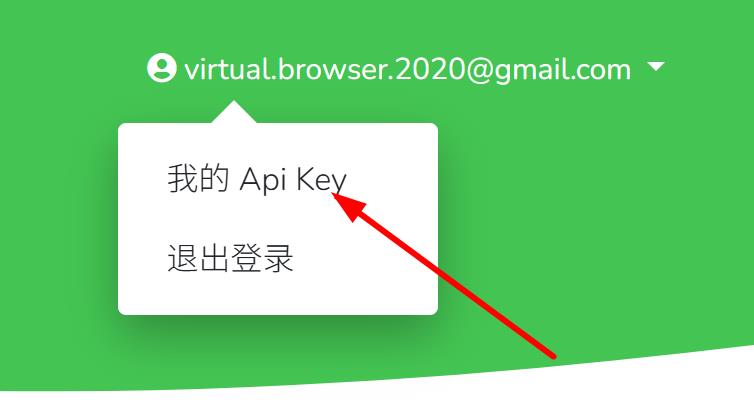
Configure in Virtual Browser
- Open the browser list → Settings
- Find IP lookup API
- Select channel (e.g. VirtualBrowser) and paste the API URL:
https://api.virtualbrowser.cc/geo?key=YOUR_API_KEY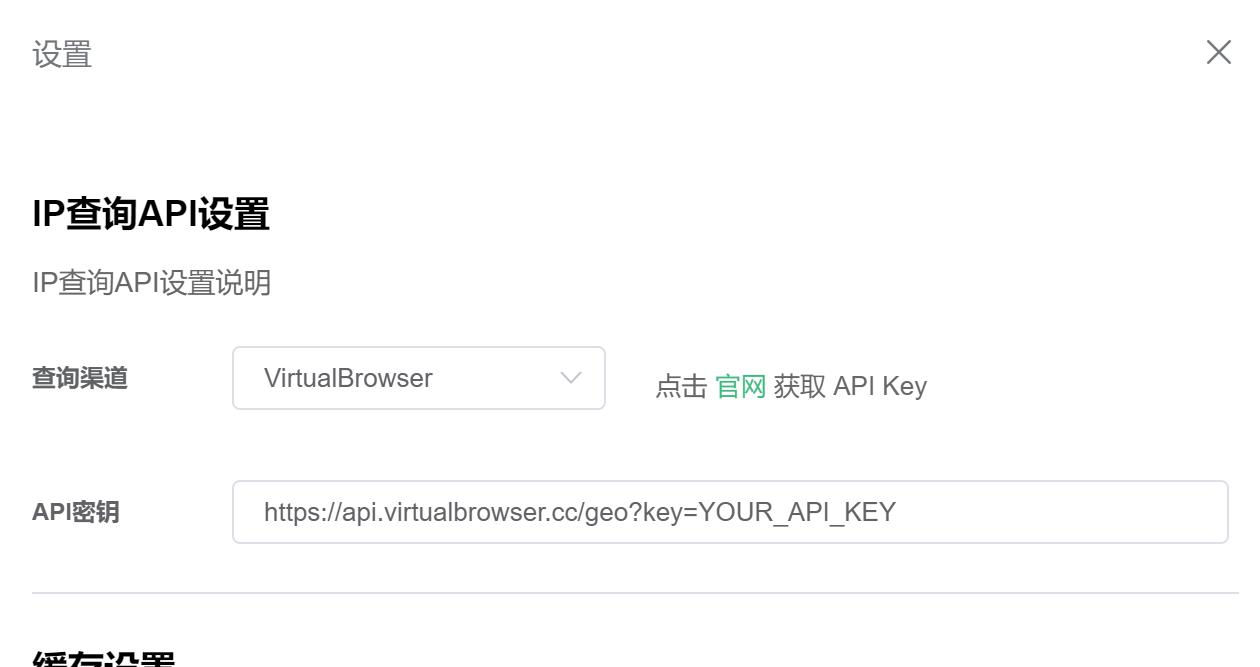
- Save
FAQ
Still says “configure IP lookup link”
- Wrong URL format or expired key
- Restart the client
- Test network without broken proxy
API errors
- Quota exceeded — wait or upgrade plan
- Service outage — retry later
Cannot save settings
- Run as administrator
- Update client to latest build
Tips
- Keep keys private; rotate periodically
- Rely on client caching to avoid excessive calls
- After saving, launch a profile and verify geo in settings
Details: IP lookup settings


